Unity UI Toolkit での座標変換
初めに
UI Toolkit での座標変換が分かりづらかったのでまとめました。
修正:2025/08/12 一部の関数で、引数が Vector3 になっていたのを Vector2 に変更
修正:2026/03/21 スクリーンサイズとパネルサイズが一致していない場合に正しくないため変更
- Unity 6000.4.0f1
参考
https://discussions.unity.com/t/is-there-runtimepanelutils-paneltoscreen/911004/6
https://light11.hatenadiary.com/entry/2023/05/10/190035
サンプルコード
using UnityEngine;
using UnityEngine.UIElements;

namespace Assets.Scripts
{
    internal static class Functions
    {
        public static Vector2 ScreenToPanelWorld(Vector2 screenPos, Vector2 panelSize)
        {
            return new Vector2(screenPos.x / Screen.width, screenPos.y / Screen.height).FlipViewportY() * panelSize;
        }

        public static Vector2 PanelWorldToScreen(Vector2 panelWorldPos, Vector2 panelSize)
        {
            return (panelWorldPos / panelSize).FlipViewportY() * new Vector2(Screen.width, Screen.height);
        }
    }
}
using UnityEngine;
using UnityEngine.UIElements;

namespace Assets.Scripts
{
    internal static class Extensions
    {
        public static Vector2 FlipY(this Vector2 position)
        {
            position.y = Screen.height - position.y;
            return position;
        }

        public static Vector2 FlipViewportY(this Vector2 viewport)
        {
            viewport.y = 1f - viewport.y;
            return viewport;
        }

        public static Vector2 PanelWorldToPanelLocal(this VisualElement ve, Vector2 panelWorldPos)
        {
            return ve.WorldToLocal(panelWorldPos);
        }

        public static Vector2 PanelLocalToPanelWorld(this VisualElement ve, Vector2 panelLocalPos)
        {
            return ve.LocalToWorld(panelLocalPos);
        }

        public static Vector2 ScreenToPanelLocal(this VisualElement ve, Vector2 screenPos, Vector2 panelSize)
        {
            var panelWorldPos = Functions.ScreenToPanelWorld(screenPos, panelSize);
            return ve.PanelWorldToPanelLocal(panelWorldPos);
        }

        public static Vector2 PanelLocalToScreen(this VisualElement ve, Vector2 panelLocalPos, Vector2 panelSize)
        {
            var panelWorldPos = ve.PanelLocalToPanelWorld(panelLocalPos);
            return Functions.PanelWorldToScreen(panelWorldPos, panelSize);
        }

        public static Vector3 PanelWorldToWorld(this Camera camera, Vector2 panelWorldPos, Vector2 panelSize)
        {
            var screenPos = Functions.PanelWorldToScreen(panelWorldPos, panelSize);
            return camera.ScreenToWorldPoint(screenPos);
        }

        public static Vector2 WorldToPanelWorld(this Camera camera, Vector3 worldPos, Vector2 panelSize)
        {
            var viewPortPoint = ((Vector2)camera.WorldToViewportPoint(worldPos)).FlipViewportY();
            return viewPortPoint * panelSize;
        }

        public static Vector3 PanelLocalToWorld(this Camera camera, VisualElement ve, Vector2 palenLocalPos, Vector2 panelSize)
        {
            var panelWorldPos = ve.PanelLocalToPanelWorld(palenLocalPos);
            return camera.PanelWorldToWorld(panelWorldPos, panelSize);
        }

        public static Vector2 WorldToPanelLocal(this Camera camera, VisualElement ve, Vector3 worldPos, Vector2 panelSize)
        {
            var panelWorldPos = camera.WorldToPanelWorld(worldPos, panelSize);
            return ve.PanelWorldToPanelLocal(panelWorldPos);
        }
    }
}
引数にある Vector2 panelSize はパネルの大きさを指定します。
PanelSettings の設定が次である場合
- Scale Mode が Scale With Screen Size
- Scale Match Mode が Expand か Shrink (Match Width or Height ではない)
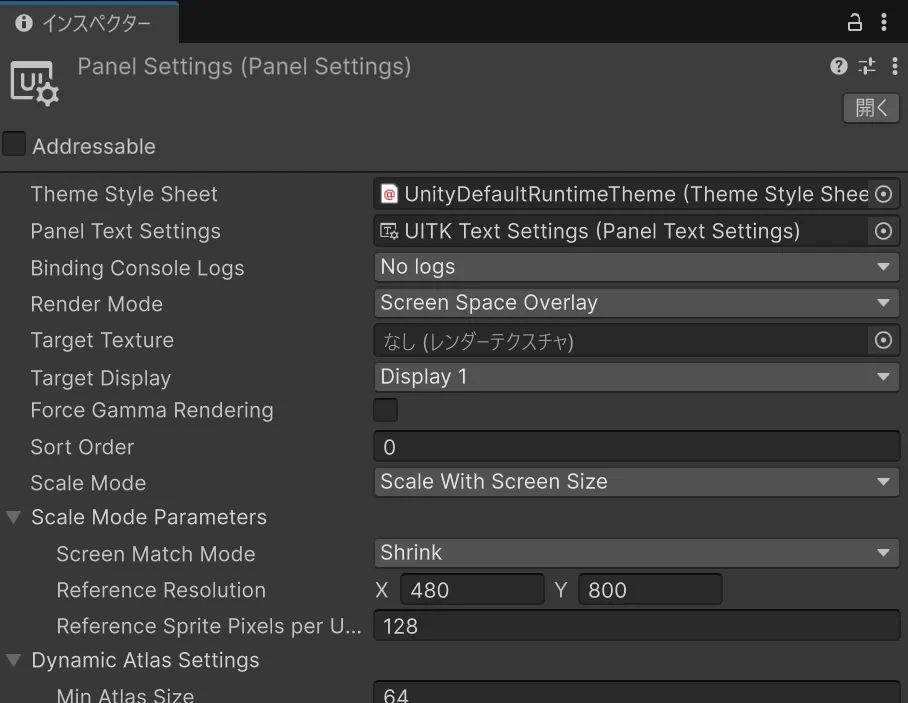
Reference Resolution と同じになるので取得もできます。
panelSize = GetComponent<UIDocument>().panelSettings.referenceResolution;